> For the complete documentation index, see [llms.txt](https://docs.enable3.io/enable3/llms.txt). Markdown versions of documentation pages are available by appending `.md` to page URLs; this page is available as [Markdown](https://docs.enable3.io/enable3/tiers.md).
# Tiers
Incentivise your customers to stay loyal over longer periods of time without inflating the reward budget.
Tiers are progressive membership levels inside a loyalty program. Tiers segment users by engagement: the more valuable actions users take – the higher Tier they reach, unlocking premium benefits.
### Why Use Tiers
#### Case #1: You want to boost retention
**Problem**: Users complete one or two actions (purchase, visit) that lead to a Reward they’re interested in. Afterwards, they disengage because there is no long-term incentive to stay active.
**Solution**: Introduce a Tier ladder (e.g., Bronze → Silver → Gold) that rewards continuous engagement with increasing benefits and status.
**How it works**: Users unlock higher Tiers by meeting defined activity thresholds. Each new Tier provides additional perks, privileges, or exclusive Rewards, creating a long-term motivation loop.
**How to do it**: Configure Tier conditions based on key engagement events (e.g., number of transactions, total spend, completed missions). Display current Tier and next-Tier progress clearly.
**Outcome**: Users return more frequently to maintain momentum and reach higher Tiers, increasing engagement frequency and long-term retention.
#### Case #2: You want to make your Loyalty Program’s value clear for users
**Problem**: Users do not understand what actions lead to better rewards, resulting in low motivation and unclear next steps.
**Solution**: Provide a transparent progression path with visible tier levels, unlock requirements, and real-time progress tracking.
**How it works**: The system displays the user’s current Tier, the next achievable Tier, and the exact criteria required to level up, turning abstract engagement goals into concrete milestones.
**How to do it**: Define measurable, easy-to-understand conditions for each Tier (e.g., “Complete 5 purchases” or “Earn 1,000 points”). Show numeric progress.
**Outcome**: Users clearly understand what to do next, which increases motivation, action completion rates, and overall program effectiveness.
#### Case #3: You don’t want to spend high costs on opportunistic users
**Problem**: You struggle to differentiate experiences between casual users and high-value customers. As a result, you waste time and resources rewarding users who only engage with your product sporadically, and consistent users don’t feel appreciated enough, thus disengaging.
**Solution**: Use Tiers as structured loyalty segments that map engagement levels to differentiated benefits and targeted campaigns. Optimize spending, dedicating a larger part to rewarding the higher Tiers.
**How it works**: Each Tier represents a defined engagement group. Admins can assign exclusive Rewards, Missions, and privileges to specific Tiers, aligning incentives with customer value.
**How to do it**: Create Tier-based segmentation in the Admin Panel and use Tiers as targeting Segments when configuring Missions and Rewards.
**Outcome**: The loyalty program becomes structured and scalable, enabling personalized incentives, better reward allocation, and improved ROI.
#### 🎯 Tiers’ benefits
* Progressive level structure → **Encourages long-term engagement and repeat activity**
* Built-in segmentation layer → **Enables precise campaign targeting without complex custom audience building**
* Configurable rule-based logic → **Drives user actions needed aligned with specific business KPIs (spend, activity, referrals, etc.)**
* Visible status and recognition → **Strengthens emotional loyalty and perceived value**
* Tier-based benefit differentiation → Allows strategic reward allocation based on customer value and engagement level → **Enables cost optimization**
### How to Set Up Tiers
{% hint style="success" %}
Available for all types of integrations, starting from No-code.
{% endhint %}
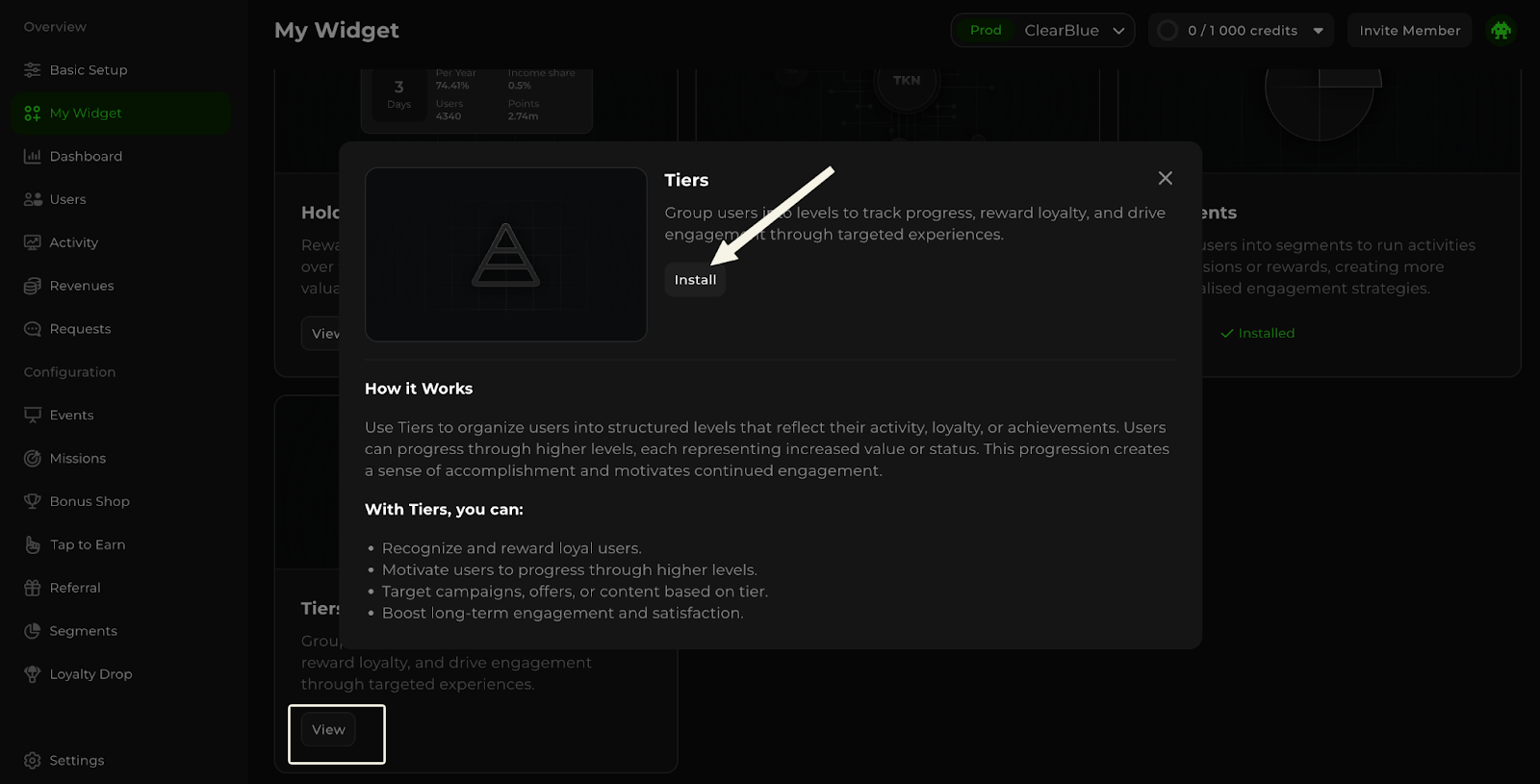
Go to the My Widget section of the Admin Panel.
Scroll down until you see the Tiers card, then click View. In the Tiers pop-up, click Install.
The Tiers section is now available in your Admin Panel menu. There, you can create and manage your Tiers.
{% hint style="warning" %}
There are **two types of Tier configurations** available:
* [based on the number of points](/enable3/tiers.md#how-to-set-up-point-based-tiers) earned;
* [based on the pre-existing segment](https://docs.google.com/document/d/1ihrO-LY66nJ2qNILk50BbofH2fAX1oNCtnYXzf6uWTc/edit?tab=t.0#heading=h.fvw1byry1wsv) (e.g., Tiers automatically assigned to new users, VIP members, users that came via the particular channel, etc.).
{% endhint %}
#### How to set up point-based Tiers
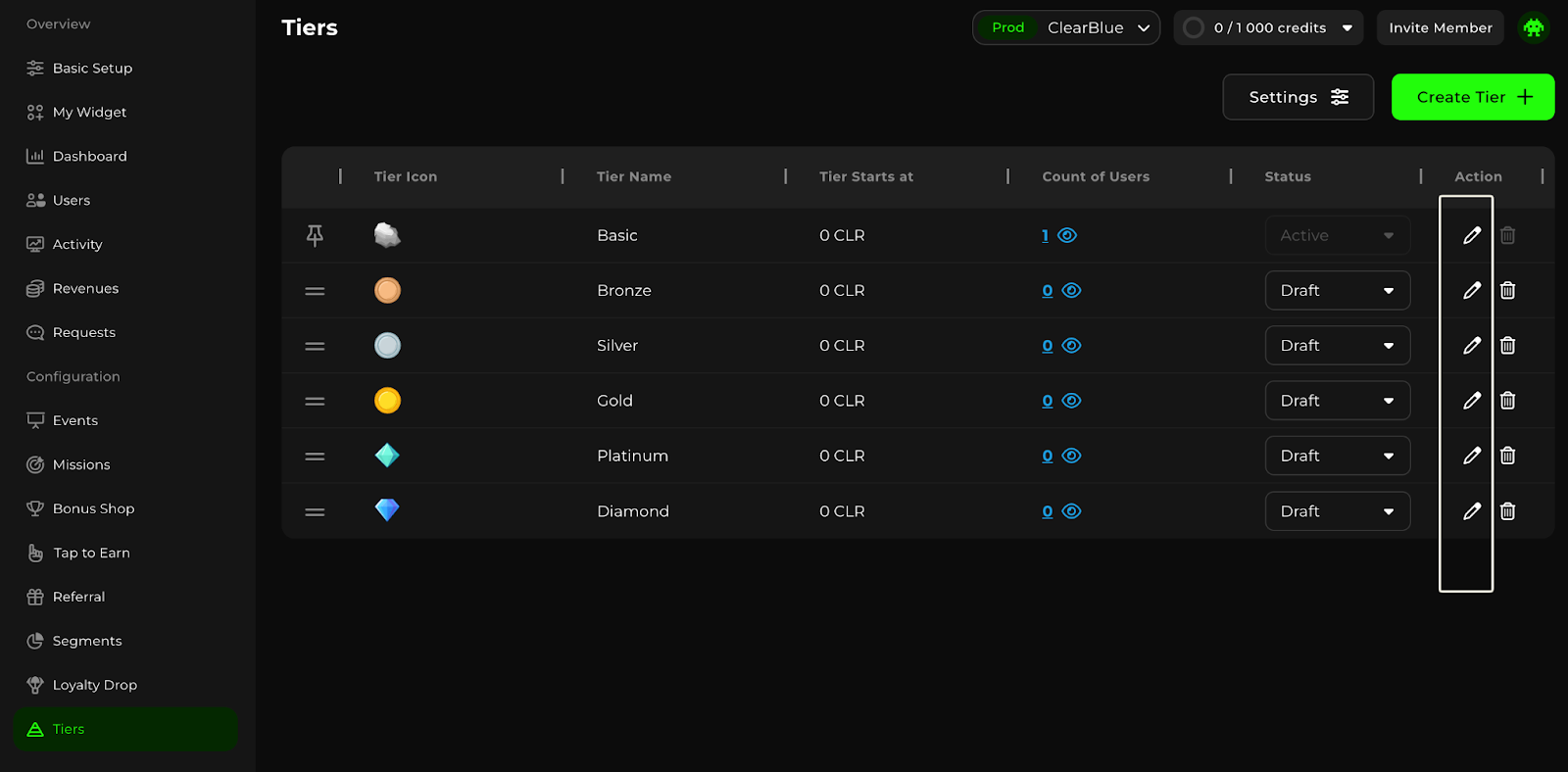
Go to the **Tiers** section of the Admin Panel. There, you’ll see the pre-made templates for different Tiers. You can configure them or create your own.
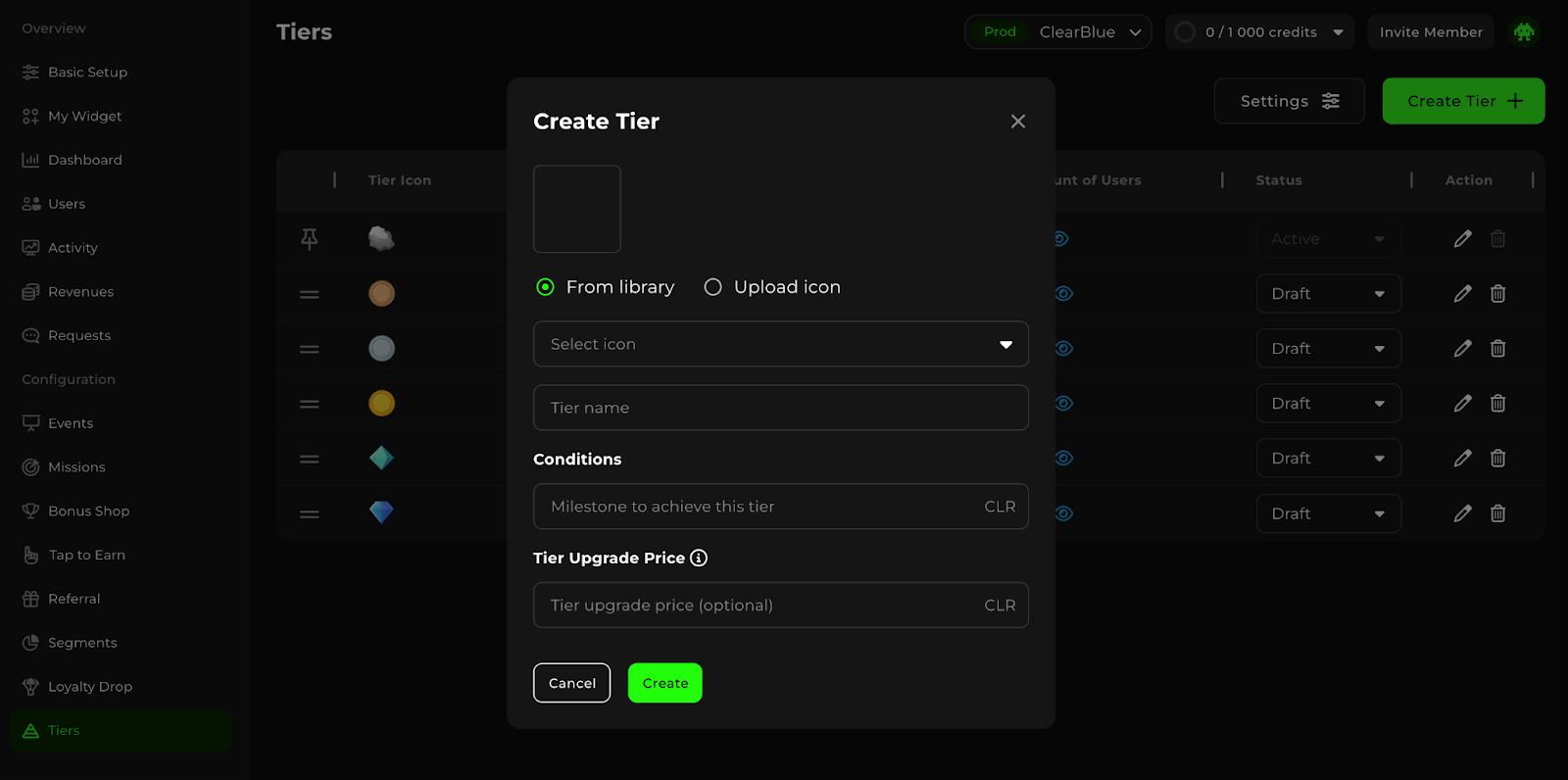
To create your own, click **Create Tier**.
In the pop-up, choose the icon for this Tier from our library or download your own; then define the name for this Tier.
Now it’s time to set the conditions for assigning users to the Tier: define the number of points needed for the user to reach this Tier under the **Conditions** section.
➡️ If you only specify the *number of points* needed for the user to reach this Tier, the *user will automatically be assigned to the Tier once they accumulate enough points*.
➡️ If you additionally specify *the number of points the user needs to spend* to reach the Tier, the user WON’T automatically be assigned to the Tier once they accumulate enough points. They will *need to spend these points on buying the Tier* in order to reach it.
Click Create. You're all set!
#### How to set up segment-based Tiers
Go to the **Tiers** section of the Admin Panel. There, you’ll see the pre-made templates for different Tiers. *Their conditions are based on points as a default.*
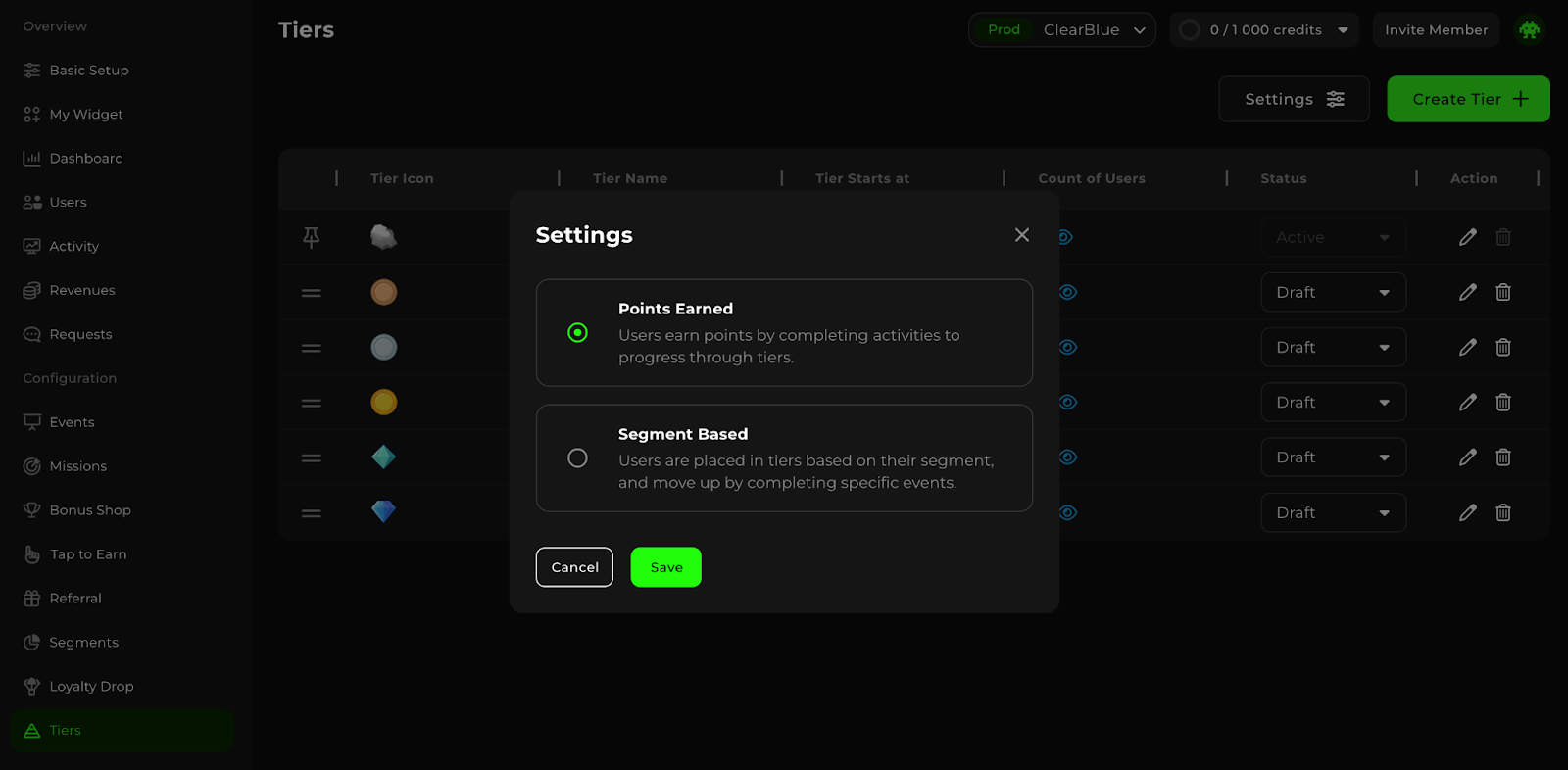
In order to switch to the segment-based Tiers, click **Settings** in the upper right corner. In the Settings pop-up, select **Segment Based** and hit Save.
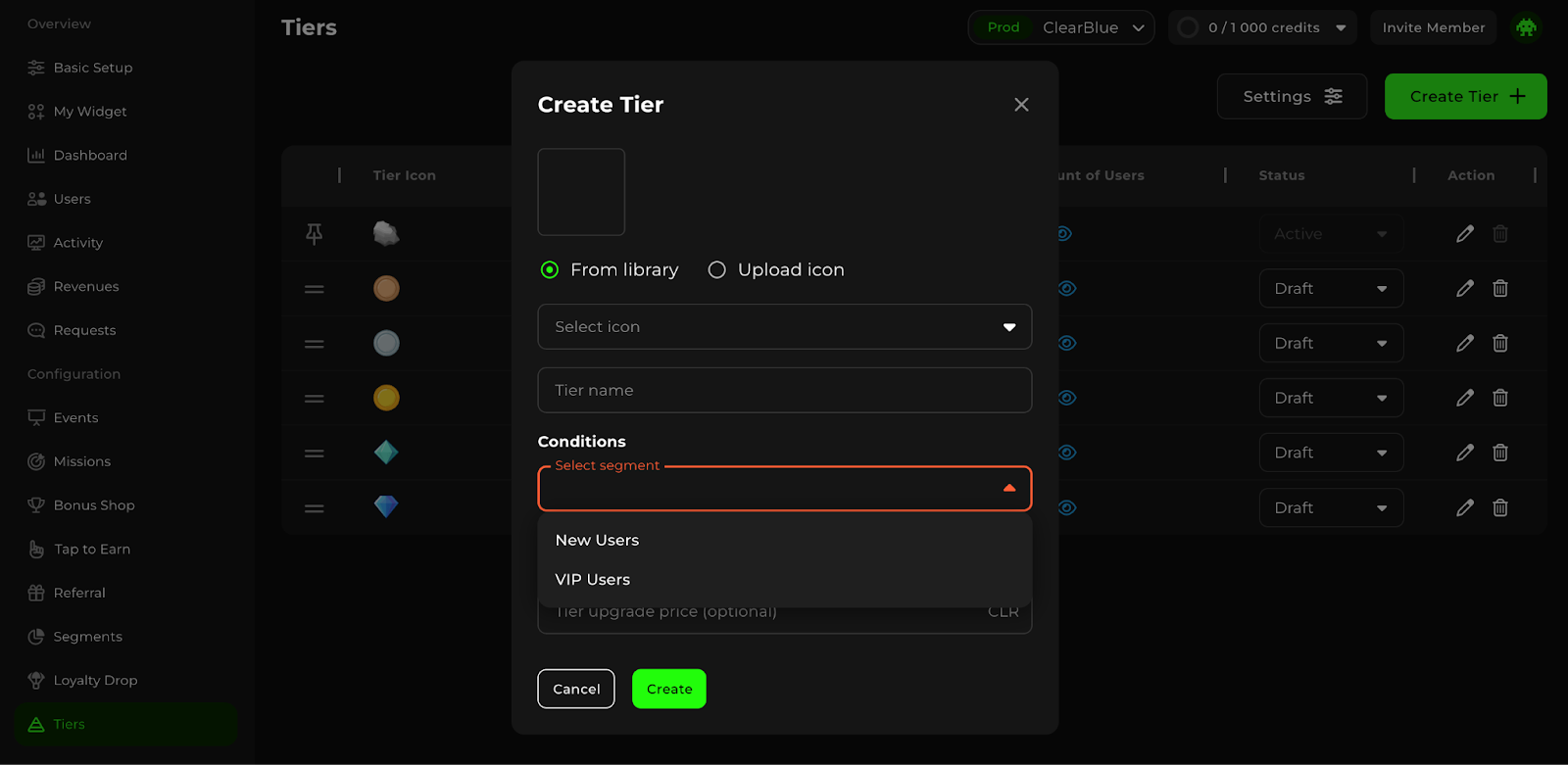
Now, to create your own segment-based Tier, click **Create Tier**.
In the pop-up, choose the icon for this Tier from our library or download your own; then define the name for this Tier.
Now it’s time to set the conditions for assigning users to the Tier: select a particular Segment of users who will reach this Tier under the **Conditions** section.
Learn more about Segments
➡️ If you only specify the *Segments* of users who reach this Tier, the *user will automatically be assigned to the Tier once they are placed in the associated Segment*.
➡️ If you additionally specify the *number of points the user needs to spend* to reach the Tier, the user WON’T automatically be assigned to the Tier. They will *need to spend these points on buying the Tier* in order to reach it.
Click Create. You're all set!
#### How to manage Tiers
In the **Tiers** section, click on the **pen icon** to edit the particular Tier.
In the pop-up, you’ll be able to change the icon, the name, and the conditions of the particular Tier.
### How to Set Up Rewards for Tiers
Go to the **Rewards** section of the Admin Panel.
Click **Create Reward**.
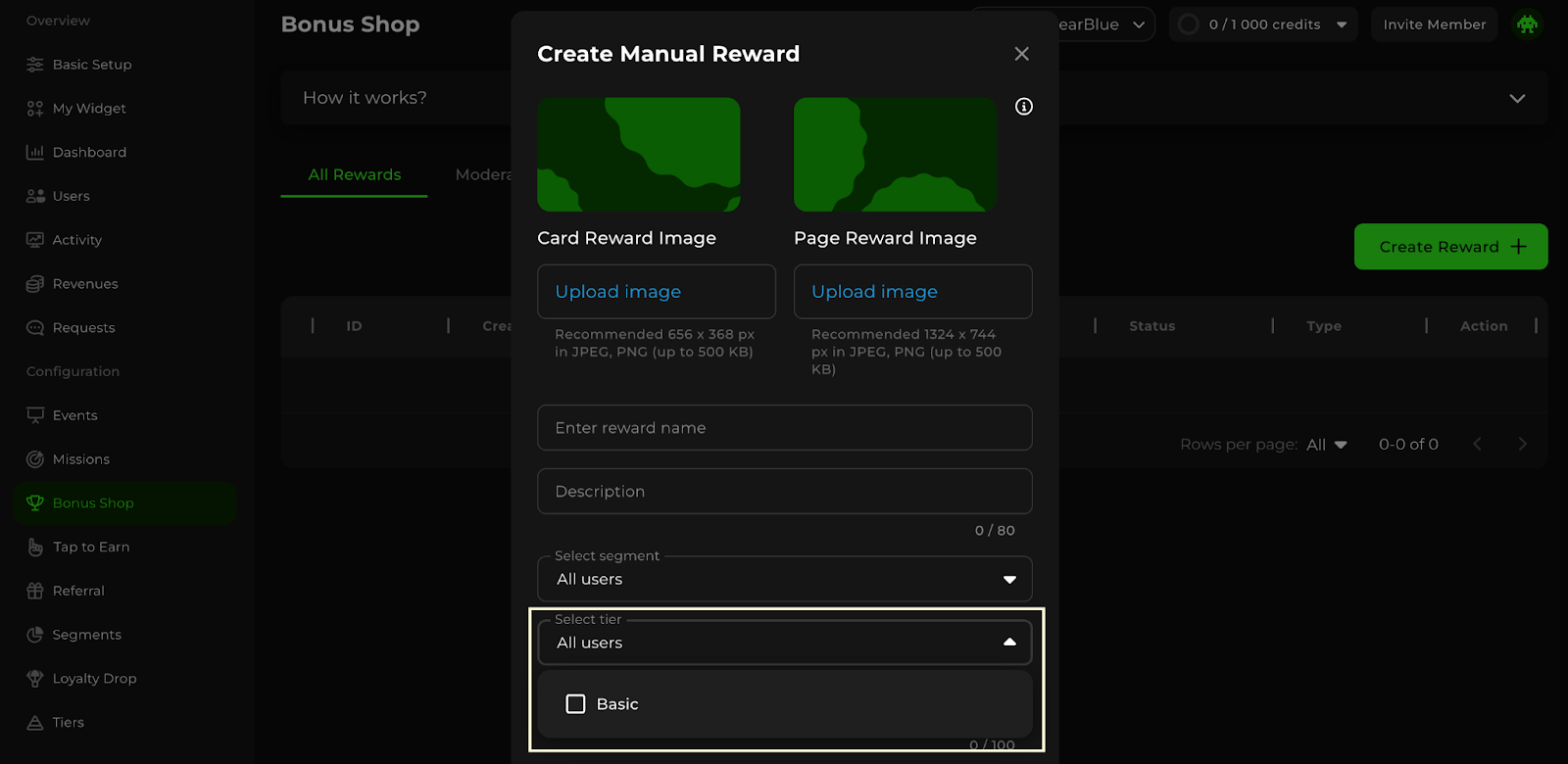
In the pop-up, choose to create a **Manual Reward**. After going through the [basic Reward creation steps](https://docs.enable3.io/enable3/rewards-and-redeem), select a **Tier** to tie this Reward to.
Scroll down and click Create.
### How Users Move Up and Down Tiers
As of now, Tiers are:
* **Rule-based**: each Tier has conditions defined by the admin.
* **Point-based**: conditions are based on points users accumulate, OR
* **Segment-based**: conditions are based on user Segment (newcomers, VIPs, referral program users, etc.)
* **Automatic**: Tier changes happen when conditions are met.
Changes happen when:
* **Users accumulate the amount of points that satisfy the next Tier’s conditions**
* **Users spend the amount of points needed to move to the next Tier**
* **Users are assigned to the Segment that is connected to another Tier**