> For the complete documentation index, see [llms.txt](https://docs.enable3.io/enable3/llms.txt). Markdown versions of documentation pages are available by appending `.md` to page URLs; this page is available as [Markdown](https://docs.enable3.io/enable3/missions/streaks.md).
# Streaks
Turn occasional user actions into predictable, repeatable behaviors – directly increasing engagement frequency and, ultimately, Customer Lifetime Value.
A **Streak** requires users to complete a particular action multiple times over a defined period (days, weeks, or months) — not just once — to gain a reward. This mechanism motivates consistent activity and builds a habit of returning to the platform.
### Why Use Streaks
#### Case #1: You want to increase product usage frequency
**Problem**: Users open the app once, complete an action, and disappear for days or weeks.
**Solution**: Use a Streak to encourage daily return behavior.
**How it works**: Instead of rewarding a single login or action, you require users to repeat it consistently. The risk of losing progress creates strong motivation to come back.
**How to do it:** Create a Mission with a **7-day login Streak**. Users must log in for **seven days in a row at least once per day**. If they miss a day, progress resets to zero.
**Outcome**: Users return daily to protect their streak. Over time, visiting your app becomes a habit — increasing exposure to in-app offers, feature discovery, and monetization opportunities.
***
#### Case #2: You want to reduce churn and retain more users
**Problem**: Users drop off after a particular period of time (e.g., 3 months).
**Solution**: Use Streaks to extend engagement beyond the “honeymoon” stage of interacting with your app.
**How it works**: Streaks create a psychological commitment. Once users have invested effort into maintaining progress, they are less likely to abandon it.
**How to do it**: Create a Mission where users have to perform a core product action (e.g., watching content or buying a subscription) **for 4 months in a row at least once per month**.
**Outcome**: Users build a routine around your product’s key value drivers, plus Streaks get them through the risky phase. Habit formation reduces churn and increases CLV.
***
#### Case #3: You want to optimize your budget
**Problem**: Large one-time rewards drain the budget without securing lasting results.
**Solution**: Offer high-value rewards only after users complete a Streak that demonstrates sustained engagement.
**How it works**: Users must demonstrate repeated behavior before unlocking the reward. This filters out low-intent users and rewards only sustained engagement.
**How to do it**: Set up **a 7-day action Streak** with a reward unlocked only after completion.
**Outcome**: You reward engaged users, not opportunistic ones. Incentive ROI increases while total reward cost remains controlled.
***
#### 🎯 Streaks’ benefits
* Consecutive action requirement → Users return more frequently and stay engaged longer → More upsell opportunities → **Increased Customer Lifetime Value (CLV)**
* Progress resets if a period is missed → Users are motivated to maintain consistency due to loss aversion → Stronger commitment and lower disengagement → **Higher retention and reduced churn**
* Fixed time logic (daily/weekly/monthly consecutive completion windows) → Engagement becomes structured and recurring rather than random → Predictable engagement patterns → **More predictable revenue forecasting**
* Streaks tied to specific feature-based missions → Users repeatedly perform core product actions → Habits form around key value-driving features → **Stronger product adoption**
### How to Create a Streak
Go to the Missions section and click Create Mission.
{% hint style="warning" %}
### The Streak mechanism works only for Event-Based Missions.
{% endhint %}
In the Create Mission pop-up, select Event-Based Mission, and click Continue.
In the New Event-Based Mission window, scroll down to the Event Details tab. Under this tab, turn on the Streak toggle.
Now, configure the Streak by defining its duration. You can set the length of the Streak in
* **days;**
* **weeks;**
* **months.**
{% hint style="info" %}
#### Streak Counting Logic
❗️The Streak duration determines how often the progress is counted.
If configured in **days** → the Mission can be completed **once per calendar day (starts 00:00 UTC)**.
If configured in **weeks** → the Mission can be completed **once per calendar week (starts on Monday, 00:00 UTC)**.
If configured in **months** → the Mission can be completed **once per calendar month (starts on the first day of each month, 00:00 UTC)**.
This means that even if a user performs the required action multiple times within the same day/week/month, it will count only once toward the Streak for that period.
Progress advances only when the action is completed in consecutive calendar periods according to the selected duration.
***Example***:
*You’re a telecom provider that wants users to top up their balance every month. You’ve configured an Event-Based Mission, where a top-up counts as an Event. Then, you turned on the Streak functionality and defined the Streak duration as 6 months.*
*If the user tops up their account at least once a month for 6 consecutive months, they complete the Mission and receive the associated Reward.*
*If the user tops up their account 2 months in a row, then skips one month, and tops up two times every month for another 4 months, they DO NOT complete the Mission and don’t get the reward.*
{% endhint %}
Now, configure the rest of the Mission parameters.
Learn how to set up Missions
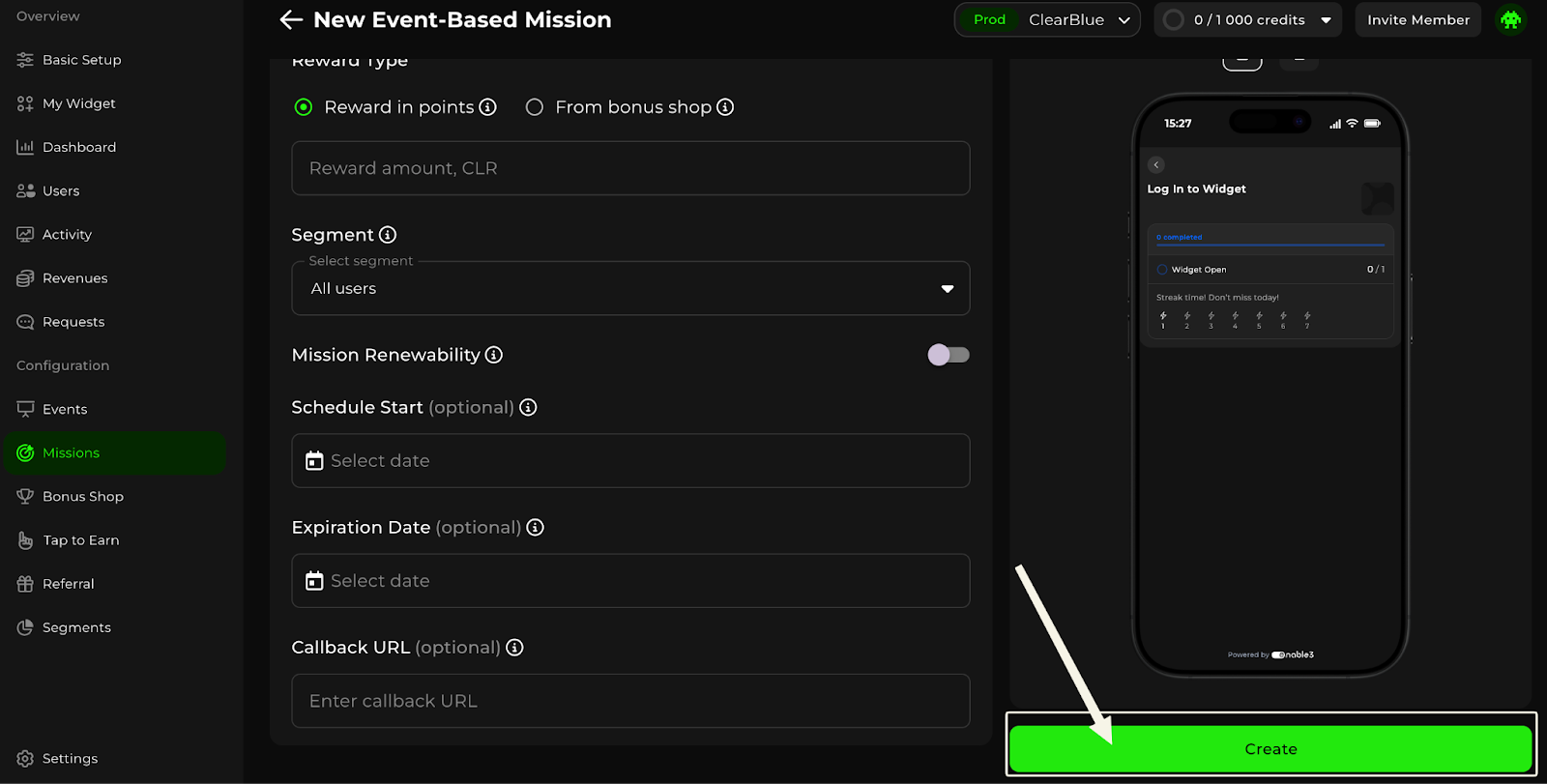
Scroll down, and click Create.
Congratulations, you’re all set!
### FAQ
What happens to my users’ progress if the Streak functionality has been enabled, but I changed the duration needed to complete the particular Mission?
If the Streak duration was increased, for example, from days to months, the user will keep their previously received progress and continue counting according to the newly set conditions.
If the Streak duration was decreased, and the user’s previously received progress is already equal to or higher than the newly set conditions, this Mission should be automatically completed for the user.
What happens to my users’ progress if a Mission had Streak functionality enabled, but then I disable it?
If the user has already completed the Mission conditions on that day –– the Mission will be completed for them.
If the user has not yet completed the Mission conditions on that day –– the progress for previous days won’t be counted, so the Mission will NOT be completed.